Yep, we may get a tiny thank-you (read: commission) when you buy through links on Techspotr — not enough for a yacht, but enough to keep the lights (and servers) on. Learn more
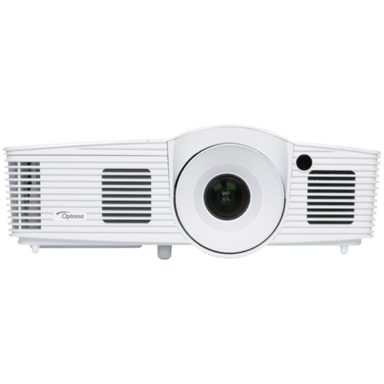
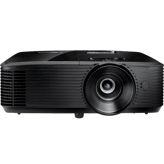
The Optoma HD26 projector comes packed with 150 useful specs & features — from general information, optical performance, projection & throw performance & lens & focus system to more. Here’s what smart shoppers are looking at on Techspotr.
A fast snapshot of the Optoma HD26, covering its standout specification and what you can expect right out of the box.
Optoma HD26
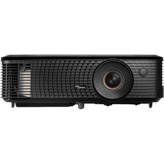
Optoma HD26 is a versatile Full HD 1080p projector featuring 3,200 lumens and dual HDMI ports, designed for seamless integration with gaming consoles and Blu-ray players for big-screen fun.
Specifications & Facts 150
Specs measured. Drama avoided.
From standout features and price to detailed pros and cons, the Optoma HD26 projector is laid bare — plus how it compares to other projectors and what shoppers are saying.
General Information 9
Optoma HD26 Release Year
What is the release year of this projector?
30 Optoma HD26 0 Votes 2014
10 Projectors in this range 2023
Optoma HD26
This model was released in 2014, which helps contextualize the technology level and features available on the projector.
Shows the year the projector model was released.
When it comes to Release Year, Optoma HD26 ◉ is better than Projector in this range ◉ , delivering higher 20 score measurement.
Don’t keep it to yourself — be the first to react and review the Release Year on Optoma HD26 ◉ and help others decide!
Optoma HD26 Color
What is the color of this projector?
21 Optoma HD26 0 Votes White
3 Projectors in this range Black
Optoma HD26
The projector's color is white, which usually blends well in home theater environments.
Indicates the color finish of the projector body.
When it comes to Color, Optoma HD26 ◉ is better than Projector in this range ◉ , delivering higher 18 score measurement.
Don’t keep it to yourself — be the first to react and review the Color on Optoma HD26 ◉ and help others decide!
Optoma HD26 Country of Manufacture
What is the country of manufacture for this projector?
81 Optoma HD26 0 Votes China
12 Projectors in this range China
Optoma HD26
The country of manufacture is China.
Indicates where the projector was manufactured.
When it comes to Country of Manufacture, Optoma HD26 ◉ is better than Projector in this range ◉ , delivering higher 69 score measurement.
Don’t keep it to yourself — be the first to react and review the Country of Manufacture on Optoma HD26 ◉ and help others decide!
Optoma HD26 Projection Technology Type
What is the projection technology type of this projector?
81 Optoma HD26 0 Votes DLP
12 Projectors in this range DLP
Optoma HD26
The projection technology type is DLP, known for good color accuracy, sharpness, and typically higher contrast ratios.
Identifies the core imaging technology used.
When it comes to Projection Technology Type, Optoma HD26 ◉ is better than Projector in this range ◉ , delivering higher 69 score measurement.
Don’t keep it to yourself — be the first to react and review the Projection Technology Type on Optoma HD26 ◉ and help others decide!
Optoma HD26 Imaging Chip Type
What is the imaging chip type of this projector?
81 Optoma HD26 0 Votes DLP Chip
11 Projectors in this range DLP Chip
Optoma HD26
The imaging chip type is DLP, a popular technology for sharp images with good contrast and color brightness.
Indicates the chip architecture that forms the image.
When it comes to Imaging Chip Type, Optoma HD26 ◉ is better than Projector in this range ◉ , delivering higher 70 score measurement.
Don’t keep it to yourself — be the first to react and review the Imaging Chip Type on Optoma HD26 ◉ and help others decide!
Optoma HD26 Product Type
What is the product type of this projector?
59 Optoma HD26 0 Votes Home Theater, Gaming
7 Projectors in this range Home Theater
Defines the general classification of this projector.
When it comes to Product Type, Optoma HD26 ◉ is better than Projector in this range ◉ , delivering higher 52 score measurement.
Don’t keep it to yourself — be the first to react and review the Product Type on Optoma HD26 ◉ and help others decide!
Optoma HD26 Build Material
What is the build material of this projector?
41 Optoma HD26 0 Votes Plastic
6 Projectors in this range Plastic
Specifies the main construction material of the chassis.
When it comes to Build Material, Optoma HD26 ◉ is better than Projector in this range ◉ , delivering higher 35 score measurement.
Don’t keep it to yourself — be the first to react and review the Build Material on Optoma HD26 ◉ and help others decide!
Optoma HD26 Intended Usage Type
What is the intended usage type of this projector?
74 Optoma HD26 0 Votes Home Theater, Gaming
9 Projectors in this range Home Theater
Describes the ideal application for this projector.
When it comes to Intended Usage Type, Optoma HD26 ◉ is better than Projector in this range ◉ , delivering higher 65 score measurement.
Don’t keep it to yourself — be the first to react and review the Intended Usage Type on Optoma HD26 ◉ and help others decide!
Optoma HD26 Imaging Chip Size
What is the imaging chip size of this projector?
0.65 inch 0Votes
0.54 inch (Average)
Specifies the size of the imaging chip. Larger chips generally improve performance.
When it comes to Imaging Chip Size, Optoma HD26 ◉ is better than Projector in this range ◉ , delivering higher 0.1 inch measurement.
Don’t keep it to yourself — be the first to react and review the Imaging Chip Size on Optoma HD26 ◉ and help others decide!
Optical Performance 14
Optoma HD26 Maximum Supported Resolution
What is the maximum supported resolution of this projector?
51 Optoma HD26 0 Votes WUXGA (1920 x 1200)
7 Projectors in this range 4K
Optoma HD26
The maximum supported resolution is WUXGA (1920 x 1200), providing slightly more vertical pixels than full HD 1080p for increased image detail.
The highest resolution signal the projector can accept.
When it comes to Maximum Supported Resolution, Optoma HD26 ◉ is better than Projector in this range ◉ , delivering higher 44 score measurement.
Don’t keep it to yourself — be the first to react and review the Maximum Supported Resolution on Optoma HD26 ◉ and help others decide!
Optoma HD26 Brightness Output
What is the brightness output?
3,200 lumen 0Votes
2,306.01 lumen (Average)
Optoma HD26
Brightness output is 3200 lumens, making this projector suitable for moderately lit rooms and delivering vivid images.
Indicates overall light output for visibility in ambient light.
When it comes to Brightness Output, Optoma HD26 ◉ is better than Projector in this range ◉ , delivering higher 894.0 lumen measurement.
Don’t keep it to yourself — be the first to react and review the Brightness Output on Optoma HD26 ◉ and help others decide!
Optoma HD26 Contrast Ratio
What is the contrast ratio of this projector?
0 Optoma HD26 0 Votes 25,000:1
1 Projectors in this range 1,000:1
Optoma HD26
The contrast ratio is 25,000:1, which provides a clear distinction between dark and bright areas for improved image quality.
Represents the difference between the darkest black and brightest white produced by the projector.
When it comes to Contrast Ratio, Optoma HD26 ◉ is worse than Projector in this range ◉ , delivering equal 1 score measurement.
Don’t keep it to yourself — be the first to react and review the Contrast Ratio on Optoma HD26 ◉ and help others decide!
Optoma HD26 Color Bit Depth
What is the color bit depth?
10 bit 0Votes
11.61 bit (Average)
Optoma HD26
Color bit depth is 10 bits, which allows for more precise color gradations and smoother transitions than 8-bit.
Determines how finely color gradients are rendered.
When it comes to Color Bit Depth, Optoma HD26 ◉ is worse than Projector in this range ◉ , delivering equal 1.6 bit measurement.
Don’t keep it to yourself — be the first to react and review the Color Bit Depth on Optoma HD26 ◉ and help others decide!
Optoma HD26 Color Gamut Coverage
What is the color gamut coverage?
100 % 0Votes
96.2 % (Average)
Optoma HD26
The color gamut coverage is 100%, indicating the projector can reproduce the full range of colors in the selected color space.
Indicates percent coverage of color spaces such as Rec.709 or DCI-P3.
When it comes to Color Gamut Coverage, Optoma HD26 ◉ is better than Projector in this range ◉ , delivering higher 3.8 % measurement.
Don’t keep it to yourself — be the first to react and review the Color Gamut Coverage on Optoma HD26 ◉ and help others decide!
Optoma HD26 Motion Processing Type
Smooth motion processing with level :val.
16 Optoma HD26 0 Votes 0–1 (Minimal)
4 Projectors in this range Not specified
Optoma HD26
Motion processing is minimal, ranging from 0 to 1, which helps maintain natural motion without overly smoothing video frames.
What is the motion processing level?
When it comes to Motion Processing Type, Optoma HD26 ◉ is better than Projector in this range ◉ , delivering higher 12 score measurement.
Don’t keep it to yourself — be the first to react and review the Motion Processing Type on Optoma HD26 ◉ and help others decide!
Optoma HD26 Sharpness Enhancement Type
Crisp detail with sharpness level :val.
51 Optoma HD26 0 Votes 2–4 (Balanced)
5 Projectors in this range 2–4 (Balanced)
Optoma HD26
Sharpness enhancement is set to a balanced level between 2 and 4, providing good image clarity without introducing excessive artifacts.
What is the sharpness enhancement level?
When it comes to Sharpness Enhancement Type, Optoma HD26 ◉ is better than Projector in this range ◉ , delivering higher 46 score measurement.
Don’t keep it to yourself — be the first to react and review the Sharpness Enhancement Type on Optoma HD26 ◉ and help others decide!
Optoma HD26 Native Resolution
What is the native resolution of this projector?
81 Optoma HD26 0 Votes 1080p
11 Projectors in this range 1080p
The true physical pixel resolution produced by the projector.
When it comes to Native Resolution, Optoma HD26 ◉ is better than Projector in this range ◉ , delivering higher 70 score measurement.
Don’t keep it to yourself — be the first to react and review the Native Resolution on Optoma HD26 ◉ and help others decide!
Optoma HD26 Dynamic Contrast Ratio
Deep dynamic contrast at :val.
3 Optoma HD26 0 Votes 10,000:1–50,000:1
0 Projectors in this range Not Specified
What is the dynamic contrast ratio?
When it comes to Dynamic Contrast Ratio, Optoma HD26 ◉ is better than Projector in this range ◉ , delivering higher 3 score measurement.
Don’t keep it to yourself — be the first to react and review the Dynamic Contrast Ratio on Optoma HD26 ◉ and help others decide!
Optoma HD26 Peak ANSI Lumens
What is the peak ANSI lumens of this projector?
3,200 lumen 0Votes
2,479.21 lumen (Average)
Industry-standard brightness measurement using ANSI method.
When it comes to Peak ANSI Lumens, Optoma HD26 ◉ is better than Projector in this range ◉ , delivering higher 720.8 lumen measurement.
Don’t keep it to yourself — be the first to react and review the Peak ANSI Lumens on Optoma HD26 ◉ and help others decide!
Optoma HD26 Dynamic Lumens
What is the dynamic lumens rating?
3,200 lumen 0Votes
2,418.02 lumen (Average)
Measures boosted brightness in enhanced dynamic modes.
When it comes to Dynamic Lumens, Optoma HD26 ◉ is better than Projector in this range ◉ , delivering higher 782.0 lumen measurement.
Don’t keep it to yourself — be the first to react and review the Dynamic Lumens on Optoma HD26 ◉ and help others decide!
Optoma HD26 Pixel Shifting
Does this projector support pixel shifting?
No 0Votes Optoma HD26
Yes Projectors in this range
Indicates whether resolution enhancement via pixel shifting is supported.
When it comes to Pixel Shifting, Optoma HD26 ◉ is worse than Projector in this range ◉ .
Don’t keep it to yourself — be the first to react and review the Pixel Shifting on Optoma HD26 ◉ and help others decide!
Optoma HD26 Frame Interpolation
Does this projector support frame interpolation?
No 0Votes Optoma HD26
Yes Projectors in this range
Allows smoother motion for sports and fast scenes.
When it comes to Frame Interpolation, Optoma HD26 ◉ is worse than Projector in this range ◉ .
Don’t keep it to yourself — be the first to react and review the Frame Interpolation on Optoma HD26 ◉ and help others decide!
Optoma HD26 Refresh Rate
What is the refresh rate?
60 Hz 0Votes
80.31 Hz (Average)
Determines motion smoothness for gaming and video.
When it comes to Refresh Rate, Optoma HD26 ◉ is worse than Projector in this range ◉ , delivering equal 20.3 Hz measurement.
Don’t keep it to yourself — be the first to react and review the Refresh Rate on Optoma HD26 ◉ and help others decide!
Projection & Throw Performance 12
Optoma HD26 Digital Zoom Level
Useful zoom reaching :valx.
26 Optoma HD26 0 Votes 1.1x (Entry)
5 Projectors in this range 1.1x–1.5x (Moderate)
Optoma HD26
Digital zoom level is 1.1x, allowing slight magnification of the image without physical lens adjustment.
What is the digital zoom level?
When it comes to Digital Zoom Level, Optoma HD26 ◉ is better than Projector in this range ◉ , delivering higher 21 score measurement.
Don’t keep it to yourself — be the first to react and review the Digital Zoom Level on Optoma HD26 ◉ and help others decide!
Optoma HD26 Minimum Throw Distance
What is the minimum throw distance?
3.9 ft 0Votes
3.2 ft (Average)
Optoma HD26
The minimum throw distance is 3.9 ft (118.87 cm), indicating the closest distance the projector can be placed to produce a clear, focused image.
Closest usable distance between projector and screen.
When it comes to Minimum Throw Distance, Optoma HD26 ◉ is worse than Projector in this range ◉ , delivering equal 0.7 ft measurement.
Don’t keep it to yourself — be the first to react and review the Minimum Throw Distance on Optoma HD26 ◉ and help others decide!
Optoma HD26 Screen Size Maximum
What is the maximum supported screen size?
300 inch 0Votes
219.41 inch (Average)
Optoma HD26
The maximum screen size supported is 300 inches (762 cm) diagonally, suitable for very large viewing setups.
Largest supported diagonal projection size.
When it comes to Screen Size Maximum, Optoma HD26 ◉ is better than Projector in this range ◉ , delivering higher 80.6 inch measurement.
Don’t keep it to yourself — be the first to react and review the Screen Size Maximum on Optoma HD26 ◉ and help others decide!
Optoma HD26 Throw Ratio
Flexible placement with :val throw ratio.
70 Optoma HD26 0 Votes 1.5–2.5+ (Long Throw)
12 Projectors in this range 1.0–1.5 (Standard)
What is the throw ratio?
When it comes to Throw Ratio, Optoma HD26 ◉ is better than Projector in this range ◉ , delivering higher 58 score measurement.
Don’t keep it to yourself — be the first to react and review the Throw Ratio on Optoma HD26 ◉ and help others decide!
Optoma HD26 Auto Keystone
Does this projector support auto keystone?
No 0Votes Optoma HD26
Yes Projectors in this range
Automatically corrects keystone distortion.
When it comes to Auto Keystone, Optoma HD26 ◉ is worse than Projector in this range ◉ .
Don’t keep it to yourself — be the first to react and review the Auto Keystone on Optoma HD26 ◉ and help others decide!
Optoma HD26 Optical Zoom Level
High-quality optical zoom at :valx.
11 Optoma HD26 0 Votes 1.1x (Entry)
3 Projectors in this range 1.1x (Entry)
What is the optical zoom level?
When it comes to Optical Zoom Level, Optoma HD26 ◉ is better than Projector in this range ◉ , delivering higher 8 score measurement.
Don’t keep it to yourself — be the first to react and review the Optical Zoom Level on Optoma HD26 ◉ and help others decide!
Optoma HD26 Maximum Throw Distance
What is the maximum throw distance?
32.8 ft 0Votes
18.8 ft (Average)
Maximum distance at which the projector can achieve a proper image.
When it comes to Maximum Throw Distance, Optoma HD26 ◉ is better than Projector in this range ◉ , delivering higher 14.0 ft measurement.
Don’t keep it to yourself — be the first to react and review the Maximum Throw Distance on Optoma HD26 ◉ and help others decide!
Optoma HD26 Short Throw
Does this projector support short throw usage?
No 0Votes Optoma HD26
Yes Projectors in this range
Indicates whether the projector is designed for short-throw projection.
When it comes to Short Throw, Optoma HD26 ◉ is worse than Projector in this range ◉ .
Don’t keep it to yourself — be the first to react and review the Short Throw on Optoma HD26 ◉ and help others decide!
Optoma HD26 Ultra Short Throw
Does this projector support ultra short throw projection?
No 0Votes Optoma HD26
Yes Projectors in this range
Indicates whether the projector can project large images at extremely short distances.
When it comes to Ultra Short Throw, Optoma HD26 ◉ is worse than Projector in this range ◉ .
Don’t keep it to yourself — be the first to react and review the Ultra Short Throw on Optoma HD26 ◉ and help others decide!
Optoma HD26 Keystone Correction Vertical
What is the vertical keystone correction?
40 degree 0Votes
33.58 degree (Average)
Vertical angle adjustment to correct image distortion.
When it comes to Keystone Correction Vertical, Optoma HD26 ◉ is better than Projector in this range ◉ , delivering higher 6.4 degree measurement.
Don’t keep it to yourself — be the first to react and review the Keystone Correction Vertical on Optoma HD26 ◉ and help others decide!
Optoma HD26 Screen Size Minimum
What is the minimum supported screen size?
28 inch 0Votes
37.57 inch (Average)
Smallest supported diagonal projection size.
When it comes to Screen Size Minimum, Optoma HD26 ◉ is better than Projector in this range ◉ , delivering higher 9.6 inch measurement.
Don’t keep it to yourself — be the first to react and review the Screen Size Minimum on Optoma HD26 ◉ and help others decide!
Optoma HD26 Projection Alignment Type
What is the projection alignment type?
31 Optoma HD26 0 Votes Front
4 Projectors in this range Front
Describes how the projector aligns with the screen.
When it comes to Projection Alignment Type, Optoma HD26 ◉ is better than Projector in this range ◉ , delivering higher 27 score measurement.
Don’t keep it to yourself — be the first to react and review the Projection Alignment Type on Optoma HD26 ◉ and help others decide!
Lens & Focus System 8
Optoma HD26 Lens Material
What is the lens material?
71 Optoma HD26 0 Votes Glass
10 Projectors in this range Glass
Optoma HD26
The lens is made of glass, which generally provides superior clarity and durability compared to plastic lenses.
Indicates the primary material used in the projector lens.
When it comes to Lens Material, Optoma HD26 ◉ is better than Projector in this range ◉ , delivering higher 61 score measurement.
Don’t keep it to yourself — be the first to react and review the Lens Material on Optoma HD26 ◉ and help others decide!
Optoma HD26 Focus Type
What is the focus type of this projector?
31 Optoma HD26 0 Votes Manual
7 Projectors in this range Manual
Defines how the projector adjusts focus.
When it comes to Focus Type, Optoma HD26 ◉ is better than Projector in this range ◉ , delivering higher 24 score measurement.
Don’t keep it to yourself — be the first to react and review the Focus Type on Optoma HD26 ◉ and help others decide!
Optoma HD26 Lens Coating Type
What is the lens coating type?
77 Optoma HD26 0 Votes Anti-Reflective
9 Projectors in this range Anti-Reflective
Defines special coatings that enhance optical performance.
When it comes to Lens Coating Type, Optoma HD26 ◉ is better than Projector in this range ◉ , delivering higher 68 score measurement.
Don’t keep it to yourself — be the first to react and review the Lens Coating Type on Optoma HD26 ◉ and help others decide!
Optoma HD26 Auto Focus
Does this projector support auto focus?
No 0Votes Optoma HD26
Yes Projectors in this range
Indicates whether the projector can automatically adjust focus.
When it comes to Auto Focus, Optoma HD26 ◉ is worse than Projector in this range ◉ .
Don’t keep it to yourself — be the first to react and review the Auto Focus on Optoma HD26 ◉ and help others decide!
Optoma HD26 Manual Focus Range
What is the manual focus range?
40 Optoma HD26 0 Votes Manual focus ring
6 Projectors in this range Manual focus ring
Indicates the distance range manual focus can adjust for.
When it comes to Manual Focus Range, Optoma HD26 ◉ is better than Projector in this range ◉ , delivering higher 34 score measurement.
Don’t keep it to yourself — be the first to react and review the Manual Focus Range on Optoma HD26 ◉ and help others decide!
Optoma HD26 Lens Protection Cover
Does this projector include a lens protection cover?
No 0Votes Optoma HD26
Yes Projectors in this range
Indicates whether the lens includes a physical protection cover.
When it comes to Lens Protection Cover, Optoma HD26 ◉ is worse than Projector in this range ◉ .
Don’t keep it to yourself — be the first to react and review the Lens Protection Cover on Optoma HD26 ◉ and help others decide!
Optoma HD26 Dustproof Lens Design
Does this projector have a dustproof lens design?
No 0Votes Optoma HD26
Yes Projectors in this range
Specifies whether the lens is designed to resist dust intrusion.
When it comes to Dustproof Lens Design, Optoma HD26 ◉ is worse than Projector in this range ◉ .
Don’t keep it to yourself — be the first to react and review the Dustproof Lens Design on Optoma HD26 ◉ and help others decide!
Optoma HD26 Lens Replacement Compatibility
Is the lens replaceable?
No 0Votes Optoma HD26
Yes Projectors in this range
Indicates whether the projector's lens can be replaced or upgraded.
When it comes to Lens Replacement Compatibility, Optoma HD26 ◉ is worse than Projector in this range ◉ .
Don’t keep it to yourself — be the first to react and review the Lens Replacement Compatibility on Optoma HD26 ◉ and help others decide!
Light Source System 10
Optoma HD26 Light Source Type
What is the light source type?
21 Optoma HD26 0 Votes Lamp
8 Projectors in this range LED
Optoma HD26
The projector uses a lamp-based light source, which typically provides good brightness but requires lamp replacement after several thousand hours of use.
Defines the illumination technology powering the projector.
When it comes to Light Source Type, Optoma HD26 ◉ is better than Projector in this range ◉ , delivering higher 13 score measurement.
Don’t keep it to yourself — be the first to react and review the Light Source Type on Optoma HD26 ◉ and help others decide!
Optoma HD26 Light Source Lifetime Eco Mode
What is the light source lifetime in eco mode?
6,500 hour 0Votes
20,667.12 hour (Average)
Optoma HD26
The light source lifetime in eco mode is 6500 hours, extending the lamp life considerably when operating in this energy-saving mode.
Estimated lifespan of the light source in eco mode.
When it comes to Light Source Lifetime Eco Mode, Optoma HD26 ◉ is worse than Projector in this range ◉ , delivering equal 14,167.1 hour measurement.
Don’t keep it to yourself — be the first to react and review the Light Source Lifetime Eco Mode on Optoma HD26 ◉ and help others decide!
Optoma HD26 Light Source Lifetime Normal Mode
What is the light source lifetime in normal mode?
5,000 hour 0Votes
16,178.79 hour (Average)
Optoma HD26
Light source lifetime in normal mode is 5000 hours, after which lamp replacement is recommended.
Estimated lifespan in standard usage mode.
When it comes to Light Source Lifetime Normal Mode, Optoma HD26 ◉ is worse than Projector in this range ◉ , delivering equal 11,178.8 hour measurement.
Don’t keep it to yourself — be the first to react and review the Light Source Lifetime Normal Mode on Optoma HD26 ◉ and help others decide!
Optoma HD26 Light Source Power Output
What is the light source power output?
240 Watt 0Votes
182.05 Watt (Average)
Optoma HD26
Light source power output is 240 Watt, typical for standard lamp-based projectors.
Indicates the wattage of the light source, affecting brightness potential.
When it comes to Light Source Power Output, Optoma HD26 ◉ is better than Projector in this range ◉ , delivering higher 57.9 Watt measurement.
Don’t keep it to yourself — be the first to react and review the Light Source Power Output on Optoma HD26 ◉ and help others decide!
Optoma HD26 Warm-Up Time
What is the warm-up time?
30 second 0Votes
13.02 second (Average)
Optoma HD26
Warm-up time is 30 seconds, the typical duration needed for the lamp to reach full brightness after powering on.
Time required for the projector to reach full brightness.
When it comes to Warm-Up Time, Optoma HD26 ◉ is worse than Projector in this range ◉ , delivering equal 17.0 second measurement.
Don’t keep it to yourself — be the first to react and review the Warm-Up Time on Optoma HD26 ◉ and help others decide!
Optoma HD26 Cool-Down Time
What is the cool-down time?
120 second 0Votes
24.34 second (Average)
Optoma HD26
Cool-down time is 120 seconds, during which the lamp and internal components are safely powered down to avoid damage.
Time required before the projector safely powers off.
When it comes to Cool-Down Time, Optoma HD26 ◉ is worse than Projector in this range ◉ , delivering equal 95.7 second measurement.
Don’t keep it to yourself — be the first to react and review the Cool-Down Time on Optoma HD26 ◉ and help others decide!
Optoma HD26 Light Source Replaceability
Can the light source be replaced?
Yes 0Votes Optoma HD26
Yes Projectors in this range
Optoma HD26
The light source is replaceable, meaning the lamp can be replaced when it reaches end of life rather than the entire unit being discarded.
Indicates whether users can replace the light source.
When it comes to Light Source Replaceability, Optoma HD26 ◉ is better than Projector in this range ◉ , delivering higher 76 score measurement.
Don’t keep it to yourself — be the first to react and review the Light Source Replaceability on Optoma HD26 ◉ and help others decide!
Optoma HD26 Light Uniformity Rating
What is the light uniformity rating of this projector?
66 Optoma HD26 0 Votes High
9 Projectors in this range High
Optoma HD26
This model offers a high light uniformity rating, which means the brightness is evenly distributed across the entire projected image, reducing hot spots or dark corners.
Indicates how evenly brightness is distributed across the screen.
When it comes to Light Uniformity Rating, Optoma HD26 ◉ is better than Projector in this range ◉ , delivering higher 57 score measurement.
Don’t keep it to yourself — be the first to react and review the Light Uniformity Rating on Optoma HD26 ◉ and help others decide!
Optoma HD26 Color Temperature
What is the color temperature setting of this projector?
14 Optoma HD26 0 Votes Warm, Neutral, Cool
2 Projectors in this range Warm, Neutral, Cool, Custom
Defines the visual warmth or coolness profile of the projected image.
When it comes to Color Temperature, Optoma HD26 ◉ is better than Projector in this range ◉ , delivering higher 12 score measurement.
Don’t keep it to yourself — be the first to react and review the Color Temperature on Optoma HD26 ◉ and help others decide!
Optoma HD26 Light Flicker Control
Does this projector include light flicker control?
No 0Votes Optoma HD26
Yes Projectors in this range
Indicates whether flicker reduction technology is implemented.
When it comes to Light Flicker Control, Optoma HD26 ◉ is worse than Projector in this range ◉ .
Don’t keep it to yourself — be the first to react and review the Light Flicker Control on Optoma HD26 ◉ and help others decide!
Imaging & Color Processing 13
Optoma HD26 Image Processing Bit Depth
What is the image processing bit depth?
8 bit 0Votes
9.97 bit (Average)
Optoma HD26
Image processing bit depth is 8 bits, allowing for standard color processing depth.
Indicates color precision and gradient smoothness.
When it comes to Image Processing Bit Depth, Optoma HD26 ◉ is worse than Projector in this range ◉ , delivering equal 2.0 bit measurement.
Don’t keep it to yourself — be the first to react and review the Image Processing Bit Depth on Optoma HD26 ◉ and help others decide!
Optoma HD26 Color Temperature Presets
What color temperature presets does this projector offer?
57 Optoma HD26 0 Votes Warm, Neutral, Cool
8 Projectors in this range Warm, Neutral, Cool
Optoma HD26
Color temperature presets include Warm, Neutral, and Cool, allowing users to adjust the image tone to their preference or ambient lighting conditions.
Preset visual warmth settings for different content.
When it comes to Color Temperature Presets, Optoma HD26 ◉ is better than Projector in this range ◉ , delivering higher 49 score measurement.
Don’t keep it to yourself — be the first to react and review the Color Temperature Presets on Optoma HD26 ◉ and help others decide!
Optoma HD26 Black Level Enhancement
Does this projector include black level enhancement?
Yes 0Votes Optoma HD26
Yes Projectors in this range
Optoma HD26
Black level enhancement is included, improving the depth and detail of dark scenes in the projected image.
Deepens dark scenes for improved shadow detail.
When it comes to Black Level Enhancement, Optoma HD26 ◉ is better than Projector in this range ◉ , delivering higher 72 score measurement.
Don’t keep it to yourself — be the first to react and review the Black Level Enhancement on Optoma HD26 ◉ and help others decide!
Optoma HD26 White Balance Control
Does this projector include white balance control?
Yes 0Votes Optoma HD26
Yes Projectors in this range
Optoma HD26
White balance control is available, allowing fine adjustments to color accuracy and image quality.
Allows tuning of color balance for accurate whites.
When it comes to White Balance Control, Optoma HD26 ◉ is better than Projector in this range ◉ , delivering higher 71 score measurement.
Don’t keep it to yourself — be the first to react and review the White Balance Control on Optoma HD26 ◉ and help others decide!
Optoma HD26 Image Scaling Engine Type
What type of image scaling engine does this projector use?
31 Optoma HD26 0 Votes Standard
7 Projectors in this range Standard
Optoma HD26
The image scaling engine type is standard, providing basic upscaling and resolution management without AI optimization.
Defines the scaling engine used to upscale lower-resolution content to the projector’s native resolution.
When it comes to Image Scaling Engine Type, Optoma HD26 ◉ is better than Projector in this range ◉ , delivering higher 24 score measurement.
Don’t keep it to yourself — be the first to react and review the Image Scaling Engine Type on Optoma HD26 ◉ and help others decide!
Optoma HD26 Color Wheel Speed (for DLP)
What is the color wheel speed of this projector?
71 Optoma HD26 0 Votes 6x
8 Projectors in this range 6x
Optoma HD26
The color wheel speed for DLP is 6x, contributing to color performance and reducing rainbow effects visible to some viewers.
Defines the rotational speed of the DLP color wheel, affecting color accuracy and rainbow artifact reduction.
When it comes to Color Wheel Speed (for DLP), Optoma HD26 ◉ is better than Projector in this range ◉ , delivering higher 63 score measurement.
Don’t keep it to yourself — be the first to react and review the Color Wheel Speed (for DLP) on Optoma HD26 ◉ and help others decide!
Optoma HD26 Image Processor Type
What is the image processor type?
21 Optoma HD26 0 Votes Standard
6 Projectors in this range Standard
Specifies the processing engine that handles color, scaling, and image optimization.
When it comes to Image Processor Type, Optoma HD26 ◉ is better than Projector in this range ◉ , delivering higher 15 score measurement.
Don’t keep it to yourself — be the first to react and review the Image Processor Type on Optoma HD26 ◉ and help others decide!
Optoma HD26 Color Calibration Profiles
What color calibration profiles are available?
64 Optoma HD26 0 Votes sRGB, Rec709, Cinema, Game
10 Projectors in this range sRGB, Rec709
Predefined settings for accurate color reproduction.
When it comes to Color Calibration Profiles, Optoma HD26 ◉ is better than Projector in this range ◉ , delivering higher 54 score measurement.
Don’t keep it to yourself — be the first to react and review the Color Calibration Profiles on Optoma HD26 ◉ and help others decide!
Optoma HD26 Auto Color Correction
Does this projector have auto color correction?
No 0Votes Optoma HD26
Yes Projectors in this range
Automatically adjusts colors for the best image quality.
When it comes to Auto Color Correction, Optoma HD26 ◉ is worse than Projector in this range ◉ .
Don’t keep it to yourself — be the first to react and review the Auto Color Correction on Optoma HD26 ◉ and help others decide!
Optoma HD26 Gamma Adjustment Levels
How many gamma adjustment levels are available?
17 Optoma HD26 0 Votes Multiple
5 Projectors in this range Multiple
Controls mid-tone brightness for accurate contrast.
When it comes to Gamma Adjustment Levels, Optoma HD26 ◉ is better than Projector in this range ◉ , delivering higher 12 score measurement.
Don’t keep it to yourself — be the first to react and review the Gamma Adjustment Levels on Optoma HD26 ◉ and help others decide!
Optoma HD26 Skin Tone Correction
Does this projector offer skin tone correction?
No 0Votes Optoma HD26
Yes Projectors in this range
Enhances natural skin tones for realistic visuals.
When it comes to Skin Tone Correction, Optoma HD26 ◉ is worse than Projector in this range ◉ .
Don’t keep it to yourself — be the first to react and review the Skin Tone Correction on Optoma HD26 ◉ and help others decide!
Optoma HD26 Noise Reduction Type
What type of noise reduction does this projector use?
31 Optoma HD26 0 Votes Standard
6 Projectors in this range Standard
Indicates the technique used to reduce visual noise and artifacts for a cleaner image.
When it comes to Noise Reduction Type, Optoma HD26 ◉ is better than Projector in this range ◉ , delivering higher 25 score measurement.
Don’t keep it to yourself — be the first to react and review the Noise Reduction Type on Optoma HD26 ◉ and help others decide!
Optoma HD26 MEMC Mode
Does this projector support MEMC mode?
No 0Votes Optoma HD26
Yes Projectors in this range
Motion interpolation for smooth fast-action content.
When it comes to MEMC Mode, Optoma HD26 ◉ is worse than Projector in this range ◉ .
Don’t keep it to yourself — be the first to react and review the MEMC Mode on Optoma HD26 ◉ and help others decide!
Smart Features & Software 8
Optoma HD26 Wi-Fi Band Support
What Wi-Fi bands does this projector support?
41 Optoma HD26 0 Votes 2.4GHz, 5GHz
6 Projectors in this range 2.4GHz, 5GHz
Optoma HD26
Supports both 2.4 GHz and 5 GHz Wi-Fi bands, allowing flexible wireless connectivity with modern networks.
Indicates the supported wireless frequency bands.
When it comes to Wi-Fi Band Support, Optoma HD26 ◉ is better than Projector in this range ◉ , delivering higher 35 score measurement.
Don’t keep it to yourself — be the first to react and review the Wi-Fi Band Support on Optoma HD26 ◉ and help others decide!
Optoma HD26 Software Update Method
What is the software update method?
61 Optoma HD26 0 Votes USB
12 Projectors in this range USB
Optoma HD26
Software updates can be applied via USB, enabling firmware upgrades by the user through a USB flash drive.
Describes how firmware updates are applied.
When it comes to Software Update Method, Optoma HD26 ◉ is better than Projector in this range ◉ , delivering higher 49 score measurement.
Don’t keep it to yourself — be the first to react and review the Software Update Method on Optoma HD26 ◉ and help others decide!
Optoma HD26 Operating System Type
What is the operating system type?
1 Optoma HD26 0 Votes No OS
6 Projectors in this range No OS
Specifies the software platform the projector runs on.
When it comes to Operating System Type, Optoma HD26 ◉ is worse than Projector in this range ◉ , delivering equal 5 score measurement.
Don’t keep it to yourself — be the first to react and review the Operating System Type on Optoma HD26 ◉ and help others decide!
Optoma HD26 App Store Support
Does this projector support an app store?
No 0Votes Optoma HD26
Yes Projectors in this range
Indicates support for downloading apps directly to the projector.
When it comes to App Store Support, Optoma HD26 ◉ is worse than Projector in this range ◉ .
Don’t keep it to yourself — be the first to react and review the App Store Support on Optoma HD26 ◉ and help others decide!
Optoma HD26 Voice Control
Does this projector support voice control?
No 0Votes Optoma HD26
Yes Projectors in this range
Enables hands-free control using supported voice assistants.
When it comes to Voice Control, Optoma HD26 ◉ is worse than Projector in this range ◉ .
Don’t keep it to yourself — be the first to react and review the Voice Control on Optoma HD26 ◉ and help others decide!
Optoma HD26 AI Auto Image Optimization
Does this projector include AI auto image optimization?
No 0Votes Optoma HD26
Yes Projectors in this range
Automatically enhances image settings using AI.
When it comes to AI Auto Image Optimization, Optoma HD26 ◉ is worse than Projector in this range ◉ .
Don’t keep it to yourself — be the first to react and review the AI Auto Image Optimization on Optoma HD26 ◉ and help others decide!
Optoma HD26 Wireless Casting
Does this projector support wireless casting?
No 0Votes Optoma HD26
Yes Projectors in this range
Indicates compatibility with casting protocols like Chromecast or AirPlay.
When it comes to Wireless Casting, Optoma HD26 ◉ is worse than Projector in this range ◉ .
Don’t keep it to yourself — be the first to react and review the Wireless Casting on Optoma HD26 ◉ and help others decide!
Optoma HD26 Smart Calibration
Does this projector support smart calibration?
No 0Votes Optoma HD26
Yes Projectors in this range
Indicates whether calibration can be optimized automatically or via app.
When it comes to Smart Calibration, Optoma HD26 ◉ is worse than Projector in this range ◉ .
Don’t keep it to yourself — be the first to react and review the Smart Calibration on Optoma HD26 ◉ and help others decide!
Connectivity & I/O Ports 13
Optoma HD26 12V Trigger Port
Does this projector have a 12V trigger port?
Yes 0Votes Optoma HD26
Yes Projectors in this range
Optoma HD26
A 12V trigger port is included, which allows external devices like motorized screens or lighting to be triggered synchronously with power on/off events from the projector.
Used to control motorized screens and automation systems.
When it comes to 12V Trigger Port, Optoma HD26 ◉ is better than Projector in this range ◉ , delivering higher 78 score measurement.
Don’t keep it to yourself — be the first to react and review the 12V Trigger Port on Optoma HD26 ◉ and help others decide!
Optoma HD26 HDMI Ports Count
How many HDMI ports does this projector have?
58 Optoma HD26 0 Votes 2
6 Projectors in this range 2
Optoma HD26
There are two HDMI ports, allowing multiple high-definition input devices to be connected simultaneously.
Number of HDMI inputs available for digital video and audio.
When it comes to HDMI Ports Count, Optoma HD26 ◉ is better than Projector in this range ◉ , delivering higher 52 score measurement.
Don’t keep it to yourself — be the first to react and review the HDMI Ports Count on Optoma HD26 ◉ and help others decide!
Optoma HD26 USB Ports Count
How many USB ports does this projector have?
51 Optoma HD26 0 Votes 1
8 Projectors in this range 1
Optoma HD26
There is one USB port supported, used for media playback, firmware updates, or power supply to accessories.
Indicates how many USB ports are available.
When it comes to USB Ports Count, Optoma HD26 ◉ is better than Projector in this range ◉ , delivering higher 43 score measurement.
Don’t keep it to yourself — be the first to react and review the USB Ports Count on Optoma HD26 ◉ and help others decide!
Optoma HD26 AV Composite Input
Does this projector offer AV composite input?
Yes 0Votes Optoma HD26
Yes Projectors in this range
Optoma HD26
An AV composite input is available, allowing legacy video device connection.
Indicates whether composite video input is available.
When it comes to AV Composite Input, Optoma HD26 ◉ is better than Projector in this range ◉ , delivering higher 76 score measurement.
Don’t keep it to yourself — be the first to react and review the AV Composite Input on Optoma HD26 ◉ and help others decide!
Optoma HD26 Wired Input Lag
What is the wired input lag?
33 ms 0Votes
27.26 ms (Average)
Optoma HD26
The wired input lag is 33 milliseconds; lower lag values benefit fast-paced gaming performance by reducing delay between input and display reaction.
Measures latency over wired connections, important for gaming.
When it comes to Wired Input Lag, Optoma HD26 ◉ is worse than Projector in this range ◉ , delivering equal 5.7 ms measurement.
Don’t keep it to yourself — be the first to react and review the Wired Input Lag on Optoma HD26 ◉ and help others decide!
Optoma HD26 Audio Out Port Type
What type of audio out port does this projector have?
11 Optoma HD26 0 Votes 3.5mm
3 Projectors in this range 3.5mm
Indicates available audio output interfaces.
When it comes to Audio Out Port Type, Optoma HD26 ◉ is better than Projector in this range ◉ , delivering higher 8 score measurement.
Don’t keep it to yourself — be the first to react and review the Audio Out Port Type on Optoma HD26 ◉ and help others decide!
Optoma HD26 RS-232 Port
Does this projector include an RS-232 port?
No 0Votes Optoma HD26
Yes Projectors in this range
Indicates support for professional control and automation systems.
When it comes to RS-232 Port, Optoma HD26 ◉ is worse than Projector in this range ◉ .
Don’t keep it to yourself — be the first to react and review the RS-232 Port on Optoma HD26 ◉ and help others decide!
Optoma HD26 HDMI Version
What HDMI version does this projector support?
21 Optoma HD26 0 Votes 1.4
8 Projectors in this range 2.0
Specifies the supported HDMI standard.
When it comes to HDMI Version, Optoma HD26 ◉ is better than Projector in this range ◉ , delivering higher 13 score measurement.
Don’t keep it to yourself — be the first to react and review the HDMI Version on Optoma HD26 ◉ and help others decide!
Optoma HD26 USB Type Support
What USB types are supported?
31 Optoma HD26 0 Votes USB-A
4 Projectors in this range USB-A
Defines the supported USB standards and connector types.
When it comes to USB Type Support, Optoma HD26 ◉ is better than Projector in this range ◉ , delivering higher 27 score measurement.
Don’t keep it to yourself — be the first to react and review the USB Type Support on Optoma HD26 ◉ and help others decide!
Optoma HD26 Ethernet Port
Does this projector support Ethernet?
No 0Votes Optoma HD26
Yes Projectors in this range
Indicates whether wired internet connectivity is available.
When it comes to Ethernet Port, Optoma HD26 ◉ is worse than Projector in this range ◉ .
Don’t keep it to yourself — be the first to react and review the Ethernet Port on Optoma HD26 ◉ and help others decide!
Optoma HD26 VGA Port
Does this projector support VGA input?
Yes 0Votes Optoma HD26
Yes Projectors in this range
Indicates presence of a VGA input for legacy devices.
When it comes to VGA Port, Optoma HD26 ◉ is better than Projector in this range ◉ , delivering higher 76 score measurement.
Don’t keep it to yourself — be the first to react and review the VGA Port on Optoma HD26 ◉ and help others decide!
Optoma HD26 Optical Audio Output
Does this projector include an optical audio output?
No 0Votes Optoma HD26
Yes Projectors in this range
Indicates availability of optical audio interface for high-quality sound systems.
When it comes to Optical Audio Output, Optoma HD26 ◉ is worse than Projector in this range ◉ .
Don’t keep it to yourself — be the first to react and review the Optical Audio Output on Optoma HD26 ◉ and help others decide!
Optoma HD26 SD Card Slot
Does this projector support an SD card slot?
No 0Votes Optoma HD26
Yes Projectors in this range
Indicates ability to read media directly from SD cards.
When it comes to SD Card Slot, Optoma HD26 ◉ is worse than Projector in this range ◉ .
Don’t keep it to yourself — be the first to react and review the SD Card Slot on Optoma HD26 ◉ and help others decide!
Audio System 9
Optoma HD26 Speaker Configuration
What is the speaker configuration?
31 Optoma HD26 0 Votes Mono
6 Projectors in this range Stereo
Optoma HD26
The audio speaker configuration is mono, meaning a single audio channel output is provided rather than stereo sound.
Describes the speaker layout inside the projector.
When it comes to Speaker Configuration, Optoma HD26 ◉ is better than Projector in this range ◉ , delivering higher 25 score measurement.
Don’t keep it to yourself — be the first to react and review the Speaker Configuration on Optoma HD26 ◉ and help others decide!
Optoma HD26 Fan Noise Level
What is the fan noise level?
26 dB 0Votes
29.35 dB (Average)
Optoma HD26
Fan noise level is 26 dB, which is relatively quiet and suitable for home theater settings where low noise is preferred.
Measures ambient noise from the projector fan.
When it comes to Fan Noise Level, Optoma HD26 ◉ is better than Projector in this range ◉ , delivering higher 3.3 dB measurement.
Don’t keep it to yourself — be the first to react and review the Fan Noise Level on Optoma HD26 ◉ and help others decide!
Optoma HD26 Audio Processing Type
What type of audio processing does this projector use?
21 Optoma HD26 0 Votes Standard
4 Projectors in this range Standard
Optoma HD26
Audio processing type is standard, providing basic audio enhancements without advanced surround or AI-based processing.
Defines the audio enhancement engine used to improve clarity, bass response, and spatial sound.
When it comes to Audio Processing Type, Optoma HD26 ◉ is better than Projector in this range ◉ , delivering higher 17 score measurement.
Don’t keep it to yourself — be the first to react and review the Audio Processing Type on Optoma HD26 ◉ and help others decide!
Optoma HD26 Dolby Audio
Does this projector support Dolby audio?
Yes 0Votes Optoma HD26
Yes Projectors in this range
Optoma HD26
Dolby Audio is supported, enhancing sound clarity and surround effects.
Determines whether the projector supports Dolby audio formats.
When it comes to Dolby Audio, Optoma HD26 ◉ is better than Projector in this range ◉ , delivering higher 74 score measurement.
Don’t keep it to yourself — be the first to react and review the Dolby Audio on Optoma HD26 ◉ and help others decide!
Optoma HD26 Sound Modes
What sound modes are available?
78 Optoma HD26 0 Votes Movie, Game
12 Projectors in this range Movie, Music
Optoma HD26
Sound modes include Movie and Game presets, optimizing audio output for cinematic viewing or interactive gameplay experiences.
Preset audio profiles optimized for different content.
When it comes to Sound Modes, Optoma HD26 ◉ is better than Projector in this range ◉ , delivering higher 66 score measurement.
Don’t keep it to yourself — be the first to react and review the Sound Modes on Optoma HD26 ◉ and help others decide!
Optoma HD26 Bluetooth Audio Output
Does this projector support Bluetooth audio output?
No 0Votes Optoma HD26
Yes Projectors in this range
Optoma HD26
Bluetooth audio output is not supported, meaning wireless audio streaming to Bluetooth speakers is unavailable.
Allows wireless output to speakers or headphones.
When it comes to Bluetooth Audio Output, Optoma HD26 ◉ is worse than Projector in this range ◉ .
Don’t keep it to yourself — be the first to react and review the Bluetooth Audio Output on Optoma HD26 ◉ and help others decide!
Optoma HD26 Speaker Output Power
What is the speaker output power?
10 Watt 0Votes
9.84 Watt (Average)
Indicates total audio power from built-in speakers.
When it comes to Speaker Output Power, Optoma HD26 ◉ is better than Projector in this range ◉ , delivering higher 0.2 Watt measurement.
Don’t keep it to yourself — be the first to react and review the Speaker Output Power on Optoma HD26 ◉ and help others decide!
Optoma HD26 DTS Audio
Does this projector support DTS audio?
No 0Votes Optoma HD26
Yes Projectors in this range
Indicates whether DTS audio decoding is available.
When it comes to DTS Audio, Optoma HD26 ◉ is worse than Projector in this range ◉ .
Don’t keep it to yourself — be the first to react and review the DTS Audio on Optoma HD26 ◉ and help others decide!
Optoma HD26 Microphone Input
Does this projector support microphone input?
No 0Votes Optoma HD26
Yes Projectors in this range
Indicates whether microphones can be connected for presentations or karaoke.
When it comes to Microphone Input, Optoma HD26 ◉ is worse than Projector in this range ◉ .
Don’t keep it to yourself — be the first to react and review the Microphone Input on Optoma HD26 ◉ and help others decide!
Controls & User Interface 11
Optoma HD26 Menu Navigation Style
What is the menu navigation style?
41 Optoma HD26 0 Votes List
7 Projectors in this range Icon-Based
Optoma HD26
The on-screen menu navigation style is list-based, making it straightforward to access projector settings.
Defines how users navigate the on-screen interface.
When it comes to Menu Navigation Style, Optoma HD26 ◉ is better than Projector in this range ◉ , delivering higher 34 score measurement.
Don’t keep it to yourself — be the first to react and review the Menu Navigation Style on Optoma HD26 ◉ and help others decide!
Optoma HD26 Auto Source Detection
Does this projector support auto source detection?
Yes 0Votes Optoma HD26
Yes Projectors in this range
Optoma HD26
Auto source detection is enabled, allowing the projector to automatically switch to an active input without manual selection.
Detects active inputs automatically.
When it comes to Auto Source Detection, Optoma HD26 ◉ is better than Projector in this range ◉ , delivering higher 70 score measurement.
Don’t keep it to yourself — be the first to react and review the Auto Source Detection on Optoma HD26 ◉ and help others decide!
Optoma HD26 Input Switching Speed
What is the input switching speed?
3 second 0Votes
2.43 second (Average)
Optoma HD26
Input switching speed is 3 seconds, which is the delay time when switching between different input sources.
Time required to change from one input to another.
When it comes to Input Switching Speed, Optoma HD26 ◉ is worse than Projector in this range ◉ , delivering equal 0.6 second measurement.
Don’t keep it to yourself — be the first to react and review the Input Switching Speed on Optoma HD26 ◉ and help others decide!
Optoma HD26 Control Panel Type
What is the control panel type?
21 Optoma HD26 0 Votes Buttons
3 Projectors in this range Buttons
Indicates the type of on-device control interface.
When it comes to Control Panel Type, Optoma HD26 ◉ is better than Projector in this range ◉ , delivering higher 18 score measurement.
Don’t keep it to yourself — be the first to react and review the Control Panel Type on Optoma HD26 ◉ and help others decide!
Optoma HD26 Remote Control Type
What type of remote control is included?
11 Optoma HD26 0 Votes Standard
8 Projectors in this range Standard
Defines the style and capability of the included remote.
When it comes to Remote Control Type, Optoma HD26 ◉ is better than Projector in this range ◉ , delivering higher 3 score measurement.
Don’t keep it to yourself — be the first to react and review the Remote Control Type on Optoma HD26 ◉ and help others decide!
Optoma HD26 Backlit Remote
Does this projector include a backlit remote?
No 0Votes Optoma HD26
Yes Projectors in this range
Indicates whether the remote supports backlighting for dark rooms.
When it comes to Backlit Remote, Optoma HD26 ◉ is worse than Projector in this range ◉ .
Don’t keep it to yourself — be the first to react and review the Backlit Remote on Optoma HD26 ◉ and help others decide!
Optoma HD26 On-Screen Menu Features
What on-screen menu features does this projector offer?
 Supermod
  Moderator